HANA News Blog
Orientation in DMO scenarios
The confusion of the DMO options
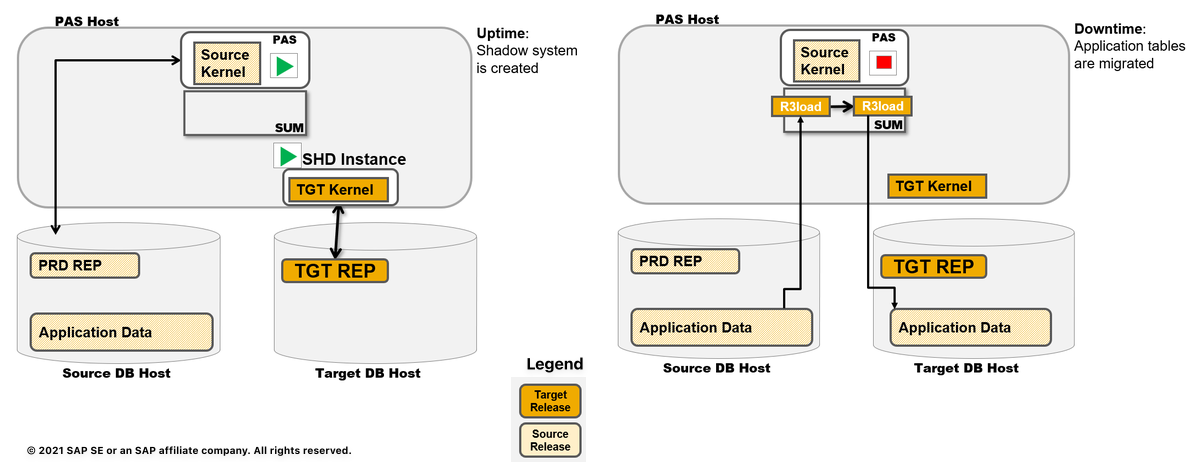
There are multiple DMO scenarios and use cases. We heard of many confusions and mixed up statements which we want to order:
SUM can not only update software components, but can also execute a database migration (for ABAP based systems)
DMO = Database Migration Option
- combination of software update with the database migration
- DMO without system update possible
- inplace-procedure: as it keeps the Application Server level unchanged, it only changes the database
- DMO supports the migration to target database type SAP HANA database, and (depending on scenario) to other database types as well
Details: SUM DMO documentation
SUM DMO is the basis for all the other option, but please don't mix them up. All of them have different requirements and restrictions.
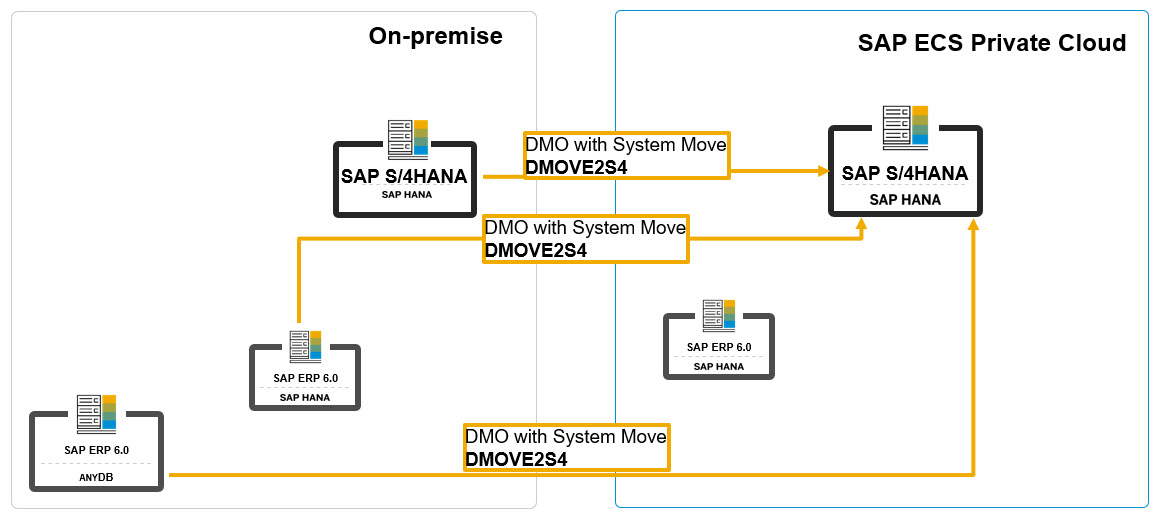
DMO with System move
You can run an update with database migration including a move of the application server instance from source to target system.
Details: DMO with System move documentation
DMOVE2S4 = DMO move to SAP S/4HANA (on hyperscaler)
DMOVE2S4 allows you to convert and transition your SAP on-premise system to SAP S/4HANA (or to SAP S/4HANA foundation based products) on hyperscaler in one step.
Sources:
DMOVE2S4 and Homogeneous option for SUM DMO by Jens Gleichmann (XLC) (10/2026)
DMOVE2S4 – your one-step approach into the cloud by Mirja Kempin (SAP) (09/2024)
DMO Move to SAP S/4HANA (on Hyperscaler) - official SAP documentation
DMOVE2S4 with doDMO = DMOVE2S4 with downtime-optimized DMO
By means of the downtime-optimized DMO to SAP HANA database, you can migrate selected large application tables already in uptime to reduce the downtime. The downtime-optimized DMO procedure performs a part of the data migration in the uptime processing. This technique significantly reduces the overall business downtime. The delta record and replay technology (CRR) ensures that any changes, which users made in the uptime but during the data migration, are considered.
=> Only SAP HANA is supported as target database type
Starting with SUM 2.0 SP 18, doDMO is supported for homogeneous DMO (SAP HANA to SAP HANA) as well.
Supported source database types are listed in SAP note 2547309.
Details: SUM downtime-optimized DMO
DMOVE2S4 with doC = DMOVE2S4 with downtime-optimized conversion
Downtime-optimized conversion with database migration includes the downtime optimization features from the downtime-optimized DMO.
This option is the default and recommended approach. It offers the best possibilities for reducing downtime and supports the following features:
- Uptime Customizing for FI Conversion (UCFC), for more information, see SAP Note 3444013
- Uptime handling of XPRAs and SDMIs, for more information, see SAP Note 3448095
- Optional: use of clone-based downtime-optimized SAP S/4 HANA Conversion, for more information, see SAP Note 3561365
The downtime-optimized conversion with database migration can also be used if the source system is already running on SAP HANA. In this case, the system migrates to the new SAP HANA instance.
Details: DMOVE2S4 with doC
The central starting point is always the SAP Software Logistics Toolset (SL Toolset). All options, documentations and downloads can be found in once place.
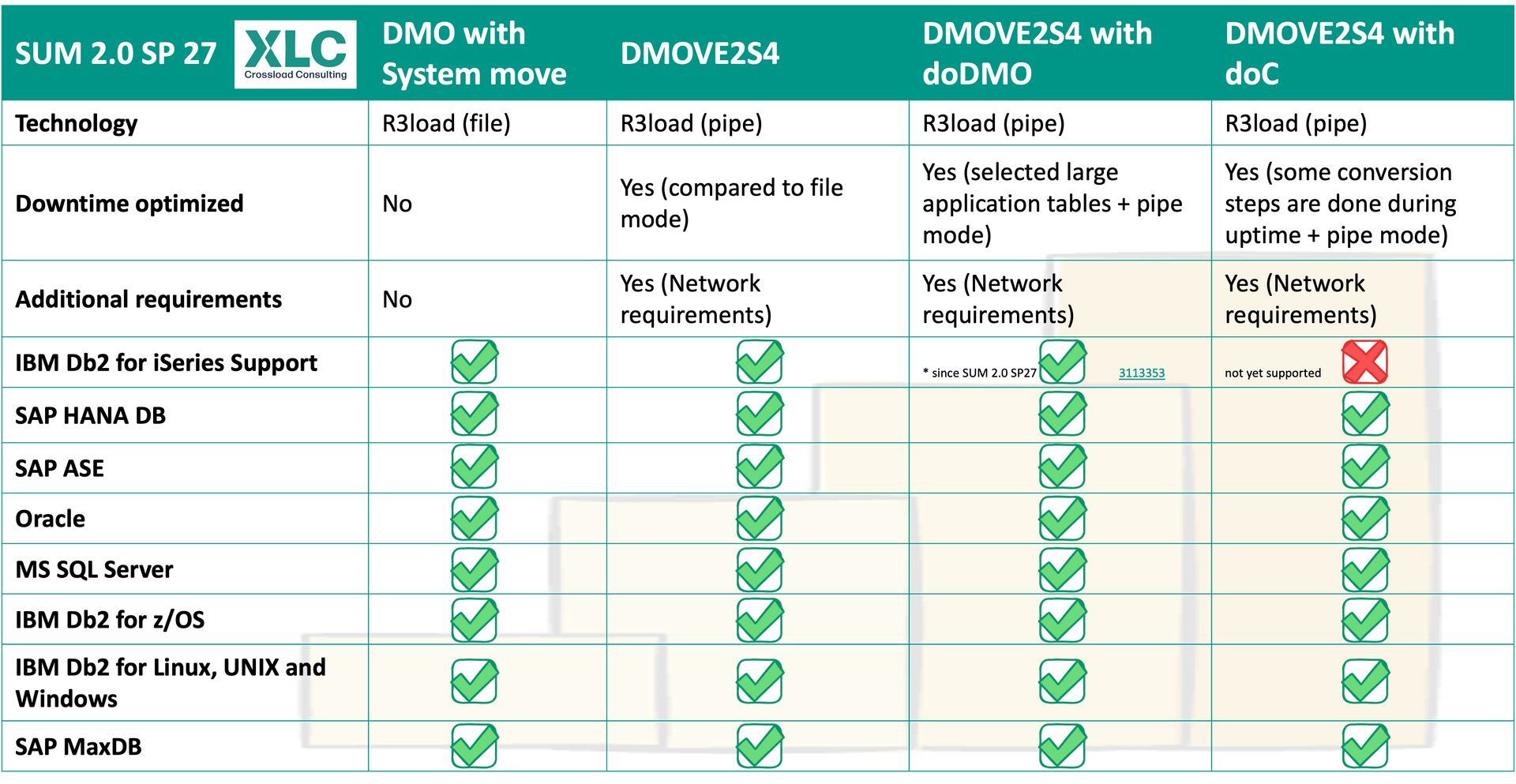
SAP HANA News by XLC